다른 UI Framework 지원#
Oasis는 Qt, LVGL과 같은 다른 UI Framework과 같이 사용할 수 있습니다.
LVGL#
LVGL을 Oasis와 동시에 사용하려면 아래와 같은 순서로 진행합니다.
oasis::ui::setup호출 시hide-unmanaged-ui-layer패러미터 키 값으로 LVGL이 사용하는 HLAYER로 설정합니다. 예로 "1:2:0" 과 같습니다.oasis::ui::getDisplayHandle를 호출하여 Display 핸들을 얻습니다.- LVGL 드라이버나 LVGL Display 객체를 생성하고,
flush_cb콜백 함수를 정의하고,flush_cb콜백 함수에서 Display 객체 등을 참조하여 렌더링을 합니다.
위 3번 과정은 LVGL 버전과 칩셋 SDK에 따라 다를 수 있습니다.
LVGL 6.1.2#
KL730 칩셋에서 lvgl 6.1.2과 lv_drivers 6.1.1를 응용 프로그램의 메인 UI 프레임워크로 사용할 경우 예입니다.
KL730 SDK에서는 lvgl/lvgl/custom/lv_custom.c에 정의되어 있는 lv_scr_setup 함수에서 Display 핸들과 스크린 크기, Layer ID를 지정합니다.
void lv_scr_setup(void *handle, uint32_t w, uint32_t h, uint32_t x, uint32_t y, VMF_VDISP_LAYER l)
실제 렌더링은 flush_cb 함수를 통하여 이루어지며, lvgl/lv_drivers/display/v4l2dev.c 에 정의되어 있습니다.
void fbdev_init(void);
void fbdev_exit(void);
void fbdev_flush(lv_disp_drv_t * drv, const lv_area_t * area, lv_color_t * color_p);
Oasis UI를 초기화 합니다. LVGL 그래픽은 Layer 2에서 처리하고, Oasis에서 Video YUV 영상은 Layer 0에서, Oasis UI는 Layer 1에서 사용하도록 설정합니다. hide-unmanaged-ui-layer에 LVGL에서 사용할 HLAYER를 지정합니다.
static int32_t oasis_setup()
{
  int32_t err;
  oasis::key_value_map_t parameters;

  parameters["offs-disable"] = "1";
  //parameters["oasis-log-flags"] = std::to_string(OASIS_LOG_DEBUG/*|OASIS_LOG_ENCODE_BITRATE*/);

  if(oasis::initialize(parameters) < 0) {
    DLOG(DLOG_ERROR, "Oasis init failed\n");
    return -1;
  }

  ////////////////////////////////////////////////////////////////////////////////////////////
  // display setup
  parameters.clear();

  parameters["memory-type"] = "ion"; //cma
  parameters["screen-width"] = "480";
  parameters["screen-height"] = "320";

  display::setup(parameters);

  //////////////////////////////////////////////////////////////////////////////////////////
  // ui setup
  parameters.clear();

  parameters["system-font-size"] = "11";
  parameters["system-font-path"] = "/mnt/sd/NanumGothicCoding.ttf";
  parameters["display-rotation"] = "0";
  parameters["enable-touch"] = "1";
  parameters["touch-cal-data-path"] = "/mnt/sd/cal.dat";

  parameters["vi0-hlayer"] = "1:0:0"; // VMF_VDISP_L0
  parameters["fb0-hlayer"] = "1:1:0"; // VMF_VDISP_L1
  parameters["hide-unmanaged-ui-layer"] = "1:2:0"; // VMF_VDISP_L2

  err = ui::setup(parameters);
  if (err < 0) {
    DLOG(DLOG_ERROR, "Oasis ui::setup failed\n");
    oasis::finalize();
    return -1;
  }

  return 0;
}
LVGL 라이브러리를 초기화합니다.
static int32_t lvgl_setup(void *disp_handle)
{
  static int32_t pool_size = 32;
  static int32_t gui_width = 480;
  static int32_t gui_height = 320;
  static int32_t gui_x = 0;
  static int32_t gui_y = 0;

  unsigned int disp_buf_size;
  lv_disp_buf_t disp_buf;
  lv_disp_drv_t disp_drv;
  lv_indev_drv_t indev_drv;
  lv_indev_t *my_indev;


  lv_init(pool_size);

  lv_scr_setup(disp_handle, gui_width, gui_height, gui_x, gui_y, VMF_VDISP_L2);

  if(v4l2dev_init()) {
    fprintf(stderr, "v4l2dev_init failed!\n");
    lv_release();
    return -1;
  }

  /*Init display buffer, allocate buffer for screen-flushing*/
  disp_buf_size = 10 * lv_scr_get_hor_res();
  lvgl_buf = (lv_color_t*)malloc(disp_buf_size * sizeof *lvgl_buf);

  /*Initialize a descriptor for the buffer*/
  lv_disp_buf_init(&disp_buf, lvgl_buf, NULL, disp_buf_size);

  /*Initialize and register a display driver*/
  lv_disp_drv_init(&disp_drv);
  disp_drv.buffer = &disp_buf;
  disp_drv.flush_cb = v4l2dev_flush;
  lv_disp_drv_register(&disp_drv);

  return 0;
}
위 코드에서 disp_handle은 oasis::ui::getDisplayHandle 를 호출하여 얻어옵니다.
void *disp_handle = ui::getDisplayHandle();
LVGL 초기화 다음에 LVGL 라이브러리를 이용하여 UI를 구성합니다. 아래는 화면에 세로 방향으로 4개 버튼을 생성하는 예입니다.
static void lvgl_draw_screen(void)
{
  lv_obj_t *scr = NULL;
  static lv_style_t button_style_rel;
  static lv_style_t button_style_pre;
  uint32_t btn_w = lv_scr_get_hor_res() / 2;
  uint32_t btn_h = lv_scr_get_ver_res() / 8;

  static const char *btn_txt[4] = {
    "page1",    "page2", "page3", "page4"
  };

  lv_point_t positons[4];

  /*Init screen*/
  scr = lv_disp_get_scr_act(NULL);
  lv_obj_clean(scr);
  lv_obj_set_style(scr, &lv_style_transp);

  /*Init button styles*/
  lv_style_copy(&button_style_rel, &lv_style_btn_rel);
  lv_style_copy(&button_style_pre, &lv_style_btn_pr);
  button_style_rel.body.opa = LV_OPA_TRANSP;
  button_style_rel.body.border.opa = LV_OPA_TRANSP;
  button_style_rel.text.color = LV_COLOR_WHITE;
  button_style_pre.body.opa = LV_OPA_TRANSP;
  button_style_pre.body.border.opa = LV_OPA_TRANSP;
  button_style_pre.text.color = LV_COLOR_YELLOW;

  for (int i = 0; i < 4; i++) {
    lv_obj_t *btn;
    char name[32];
    lv_obj_t *label;
    uint32_t offset = btn_h * 2 + i * btn_h;
    lv_area_t coords;

    btn = lv_btn_create(scr, NULL);
    lv_btn_set_style(btn, LV_BTN_STYLE_REL, &button_style_rel);
    lv_btn_set_style(btn, LV_BTN_STYLE_PR,  &button_style_pre);
    lv_obj_set_size(btn, btn_w, btn_h);
    lv_obj_align(btn, NULL, LV_ALIGN_IN_TOP_MID, 0, offset);
    lv_obj_get_coords(btn, &coords);
    positons[i].x = (coords.x1 + coords.x2) >> 1;
    positons[i].y = (coords.y1 + coords.y2) >> 1;

    strncpy(name, btn_txt[i], 31);
    label = lv_label_create(btn, NULL);
    lv_label_set_text(label, name);
  }
}
Oasis UI를 사용할 경우, 아래 코드 예 처럼 Oasis UI API를 이용합니다. 아래 예는 화면 중앙에 "Hello, World!" 라벨을 표시합니다.
static void oasis_draw_screen()
{
  ui::ScreenRef screen = ui::getDefaultScreen();

  int32_t screen_width = ui::screenWidth(screen);
  int32_t screen_height = ui::screenHeight(screen);

  ui::WindowRef window = ui::createWindow("Hello");

  ui::BoxRef vbox = ui::createBox(ui::kOrientationVertical, false, 6);
  ui::setVAlign(vbox, ui::kAlignCenter);

  ui::LabelRef label = ui::createLabelWithText("Hello, World!");
  ui::setVAlign(label, ui::kAlignCenter);
  ui::setHAlign(label, ui::kAlignCenter);
  ui::setLabelHorzJustification(label, ui::kJustificationCenter);
  ui::setLabelVertJustification(label, ui::kJustificationCenter);
  ui::setLabelFontPointSize(label, 16);

  ui::boxPackStart(vbox, label, true, true, 0);

  ui::containerAdd(window, vbox);
  ui::screenAdd(screen, window);

  ui::setVisible(window, true);
}
Note
LVGL 을 메인 쓰레드가 아닌 별도 쓰레드를 생성하여 사용합니다.
종료시에 LVGL을 해제합니다.
static void lvgl_cleanup()
{
  if(lvgl_buf) {
    free(lvgl_buf);
    lvgl_buf = nullptr;
  }

  v4l2dev_release();
  lv_release();
}
LVGL 해제 후 Oasis도 해제합니다.
static void oasis_cleanup()
{
  oasis::ui::cleanup();
  oasis::finalize();
}
전체 예제코드는 아래와 같습니다.
#include "OasisAPI.h"
#include "OasisLog.h"
#include "OasisUI.h"
#include "OasisUtil.h"
#include "OasisDisplay.h"

#include <sys/types.h>
#include <sys/stat.h>
#include <unistd.h>
#include <dirent.h>

#include <thread>
#include <mutex>
#include <memory>
#include <condition_variable>

#include "lvgl/lvgl.h"
#include "lvgl/custom/lv_custom.h"
#include "lv_drivers/display/v4l2dev.h"

#undef DLOG_TAG
#define DLOG_TAG "Hello-LVGL"


using namespace oasis;

static bool got_interrupt = false;
static lv_color_t *lvgl_buf = nullptr;

#include <signal.h>

void cancel_handler(int sig)
{
  got_interrupt = true;
}

static void lvgl_draw_screen(void)
{
  lv_obj_t *scr = NULL;
  static lv_style_t button_style_rel;
  static lv_style_t button_style_pre;
  uint32_t btn_w = lv_scr_get_hor_res() / 2;
  uint32_t btn_h = lv_scr_get_ver_res() / 8;

  static const char *btn_txt[4] = {
    "page1",    "page2", "page3", "page4"
  };

  lv_point_t positons[4];

  /*Init screen*/
  scr = lv_disp_get_scr_act(NULL);
  lv_obj_clean(scr);
  lv_obj_set_style(scr, &lv_style_transp);

  /*Init button styles*/
  lv_style_copy(&button_style_rel, &lv_style_btn_rel);
  lv_style_copy(&button_style_pre, &lv_style_btn_pr);
  button_style_rel.body.opa = LV_OPA_TRANSP;
  button_style_rel.body.border.opa = LV_OPA_TRANSP;
  button_style_rel.text.color = LV_COLOR_WHITE;
  button_style_pre.body.opa = LV_OPA_TRANSP;
  button_style_pre.body.border.opa = LV_OPA_TRANSP;
  button_style_pre.text.color = LV_COLOR_YELLOW;

  for (int i = 0; i < 4; i++) {
    lv_obj_t *btn;
    char name[32];
    lv_obj_t *label;
    uint32_t offset = btn_h * 2 + i * btn_h;
    lv_area_t coords;

    btn = lv_btn_create(scr, NULL);
    lv_btn_set_style(btn, LV_BTN_STYLE_REL, &button_style_rel);
    lv_btn_set_style(btn, LV_BTN_STYLE_PR,  &button_style_pre);
    lv_obj_set_size(btn, btn_w, btn_h);
    lv_obj_align(btn, NULL, LV_ALIGN_IN_TOP_MID, 0, offset);
    lv_obj_get_coords(btn, &coords);
    positons[i].x = (coords.x1 + coords.x2) >> 1;
    positons[i].y = (coords.y1 + coords.y2) >> 1;

    strncpy(name, btn_txt[i], 31);
    label = lv_label_create(btn, NULL);
    lv_label_set_text(label, name);
  }
}


static int32_t lvgl_setup(void *disp_handle)
{
  static int32_t pool_size = 32;
  static int32_t gui_width = 480;
  static int32_t gui_height = 320;
  static int32_t gui_x = 0;
  static int32_t gui_y = 0;

  unsigned int disp_buf_size;
  lv_disp_buf_t disp_buf;
  lv_disp_drv_t disp_drv;
  lv_indev_drv_t indev_drv;
  lv_indev_t *my_indev;


  lv_init(pool_size);

  lv_scr_setup(disp_handle, gui_width, gui_height, gui_x, gui_y, VMF_VDISP_L2);

  if(v4l2dev_init()) {
    fprintf(stderr, "v4l2dev_init failed!\n");
    lv_release();
    return -1;
  }

  /*Init display buffer, allocate buffer for screen-flushing*/
  disp_buf_size = 10 * lv_scr_get_hor_res();
  lvgl_buf = (lv_color_t*)malloc(disp_buf_size * sizeof *lvgl_buf);

  /*Initialize a descriptor for the buffer*/
  lv_disp_buf_init(&disp_buf, lvgl_buf, NULL, disp_buf_size);

  /*Initialize and register a display driver*/
  lv_disp_drv_init(&disp_drv);
  disp_drv.buffer = &disp_buf;
  disp_drv.flush_cb = v4l2dev_flush;
  lv_disp_drv_register(&disp_drv);

  return 0;
}

static void lvgl_cleanup()
{
  if(lvgl_buf) {
    free(lvgl_buf);
    lvgl_buf = nullptr;
  }

  v4l2dev_release();
  lv_release();
}

static void oasis_draw_screen()
{
  ui::ScreenRef screen = ui::getDefaultScreen();

  int32_t screen_width = ui::screenWidth(screen);
  int32_t screen_height = ui::screenHeight(screen);

  ui::WindowRef window = ui::createWindow("Hello");

  ui::BoxRef vbox = ui::createBox(ui::kOrientationVertical, false, 6);
  ui::setVAlign(vbox, ui::kAlignCenter);

  ui::LabelRef label = ui::createLabelWithText("Hello, World!");
  ui::setVAlign(label, ui::kAlignCenter);
  ui::setHAlign(label, ui::kAlignCenter);
  ui::setLabelHorzJustification(label, ui::kJustificationCenter);
  ui::setLabelVertJustification(label, ui::kJustificationCenter);
  ui::setLabelFontPointSize(label, 16);

  ui::boxPackStart(vbox, label, true, true, 0);

  ui::containerAdd(window, vbox);
  ui::screenAdd(screen, window);

  ui::setVisible(window, true);
}

static int32_t oasis_setup()
{
  int32_t err;
  oasis::key_value_map_t parameters;

  parameters["offs-disable"] = "1";
  //parameters["oasis-log-flags"] = std::to_string(OASIS_LOG_DEBUG/*|OASIS_LOG_ENCODE_BITRATE*/);

  if(oasis::initialize(parameters) < 0) {
    DLOG(DLOG_ERROR, "Oasis init failed\n");
    return -1;
  }

  ////////////////////////////////////////////////////////////////////////////////////////////
  // display setup
  parameters.clear();

  parameters["memory-type"] = "ion"; //cma
  parameters["screen-width"] = "480";
  parameters["screen-height"] = "320";

  display::setup(parameters);

  //////////////////////////////////////////////////////////////////////////////////////////
  // ui setup
  parameters.clear();

  parameters["system-font-size"] = "11";
  parameters["system-font-path"] = "/mnt/sd/NanumGothicCoding.ttf";
  parameters["display-rotation"] = "0";
  parameters["enable-touch"] = "1";
  parameters["touch-cal-data-path"] = "/mnt/sd/cal.dat";

  parameters["vi0-hlayer"] = "1:0:0"; // VMF_VDISP_L0
  parameters["fb0-hlayer"] = "1:1:0"; // VMF_VDISP_L1
  parameters["hide-unmanaged-ui-layer"] = "1:2:0"; // VMF_VDISP_L2

  err = ui::setup(parameters);
  if (err < 0) {
    DLOG(DLOG_ERROR, "Oasis ui::setup failed\n");
    oasis::finalize();
    return -1;
  }


  return 0;
}

static void oasis_cleanup()
{
  oasis::ui::cleanup();
  oasis::finalize();
}

int main(int argc, char *argv[])
{
  int32_t err;
  std::thread t;

  signal(SIGINT, cancel_handler);


  if(oasis_setup() < 0) {
    fprintf(stderr, "Oasis setup failed\n");
    return -1;
  }

  oasis_draw_screen();

  t = std::thread([&]() {

    void *disp_handle = ui::getDisplayHandle();
    if(!disp_handle) {
      fprintf(stderr, "display handle not found!\n");
      got_interrupt = true;
      return;
    }

    if(lvgl_setup(disp_handle) < 0) {
      got_interrupt = true;
      return;
    }

    lvgl_draw_screen();

    do {
      try {
        lv_task_handler();
      } catch(...) {
        fprintf(stderr, "lvgl got exception!\n");
        got_interrupt = true;
        break;
      }
      usleep(10000);
    } while(got_interrupt == false);

    lvgl_cleanup();
  });

  fprintf(stdout, "press ctrl+c to exit\n");

  do {
    usleep(10000);
  } while(got_interrupt == false);

  t.join();

done:
  oasis_cleanup();

  return 0;
}
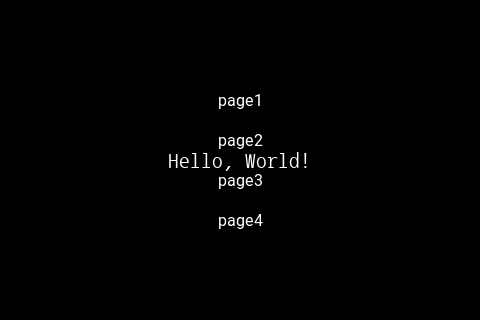
아래는 실행 화면 입니다. 화면에서 page1, page2, page3, page4 버튼은 LVGL UI 이며, Hello, World!는 Oasis UI입니다.
LVGL 9.4#
KL730 칩셋에서 lvgl 9.4를 응용 프로그램의 메인 UI 프레임워크로 사용할 경우 예입니다.
Display는 720x1920 이며, LVGL은 90도 회전된 1920x720 화면을 사용하는 환경을 가정합니다.
LVGL Display 렌더링을 위한 장치 객체를 생성하고, 이것을 flush_cb에서 사용하는 방식입니다.
위 LVGL 6.1.2 예에서 LVGL 관련 변경된 부분만 설명합니다.
Display 관련 전역 변수를 정의합니다.
#define PIXEL_STRIDE 4
static int32_t gui_width = 720;
static int32_t gui_height = 1920;
static int32_t gui_stride = ALIGN_64B(gui_width*PIXEL_STRIDE);
static int32_t gui_x = 0;
static int32_t gui_y = 0;
LVGL을 설정합니다. 회전을 사용하지 않는 경우, LV_DISPLAY_RENDER_MODE_DIRECT 모드를 지정하여 렌더링 시에 바로 Display의 frame buffer에 쓰도록 합니다. 회전을 사용할 경우, LV_DISPLAY_RENDER_MODE_PARTIAL 모드를 지정하여, 부분별로 회전한 결과를 Display의 frame buffer에 쓰도록 합니다.
static int32_t lvgl_setup(void *disp_handle)
{
  lv_display_t *disp = NULL;
  LV_CUSTOM_DRV_T *drvobj = NULL;
  lv_color_format_t cf = LV_COLOR_FORMAT_ARGB8888;
  lv_display_rotation_t rotation = LV_DISPLAY_ROTATION_90;
  lv_init();
  lv_tick_set_cb(lv_kl730_get_ms);

  drvobj = lv_kl730_create_drvobj(disp_handle, VMF_VDISP_L2, gui_width, gui_height, gui_stride, cf, rotation);
  if(!drvobj) {
    lv_deinit();
    fprintf(stderr, "lv_kl730_create_drvobj failed\n");
    return -1;
  }

  disp = lv_display_create(gui_width, gui_height);
  lv_display_set_rotation(disp, rotation);
  lv_display_set_color_format(disp, cf);
  lv_display_set_driver_data(disp, drvobj);

  lvgl_canvas_width = lv_display_get_horizontal_resolution(NULL);
  lvgl_canvas_height = lv_display_get_vertical_resolution(NULL);
  lvgl_canvas_stride = lv_draw_buf_width_to_stride(lvgl_canvas_width, cf);
  lvgl_canvas_size = lvgl_canvas_stride*lvgl_canvas_height;
  lvgl_canvas_buffer = (uint8_t*)calloc(1, lvgl_canvas_size);

  if(rotation == LV_DISPLAY_ROTATION_90 || rotation == LV_DISPLAY_ROTATION_270) {
    lv_display_set_buffers_with_stride(disp, drvobj->lvBuffers[0], drvobj->lvBuffers[1], drvobj->dwLvBufferSize, gui_stride, LV_DISPLAY_RENDER_MODE_PARTIAL);
    //lv_display_set_flush_cb(disp, lv_kl730_flush_cb_partial);
    lv_display_set_flush_cb(disp, lv_capture_flush_cb);
  } else {
    lv_display_set_buffers_with_stride(disp, drvobj->lvBuffers[0], drvobj->lvBuffers[1], drvobj->dwLvBufferSize, gui_stride, LV_DISPLAY_RENDER_MODE_DIRECT);
    lv_display_set_flush_cb(disp, lv_kl730_flush_cb_direct);
  }

  lvgl_init_style();

  return 0;
}
아래는 Display 드라이버 객체 생성함수입니다.
LV_CUSTOM_DRV_T *lv_kl730_create_drvobj(void *disp_handle, VMF_VDISP_LAYER layer, int32_t width, int32_t height, int32_t stride, lv_color_format_t cf, lv_display_rotation_t rotation)
{
  uint32_t buf_size;
  VMF_DMA_1D_INIT_T dma_init = { 0 };

  memset(&lv_disp_drv, 0, sizeof(lv_disp_drv));

  lv_disp_drv.ptDisp = disp_handle;
  lv_disp_drv.width = width;
  lv_disp_drv.height = height;
  lv_disp_drv.stride = stride;
  lv_disp_drv.dwBufSize = stride*height;

  switch(layer) {
  case VMF_VDISP_L0:
    lv_disp_drv.fnDispProc = VMF_VDISP_ProcessOneFrame;
    lv_disp_drv.fnDispStop = VMF_VDISP_Stop;
    break;
  case VMF_VDISP_L1:
    lv_disp_drv.fnDispProc = VMF_VDISP_PIP_ProcessOneFrame;
    lv_disp_drv.fnDispStop = VMF_VDISP_PIP_Stop;
    break;
  case VMF_VDISP_L2:
    lv_disp_drv.fnDispProc = VMF_VDISP_PIP2_ProcessOneFrame;
    lv_disp_drv.fnDispStop = VMF_VDISP_PIP2_Stop;
    break;
  default:
    return NULL;
  }

  int32_t lv_buffer_count = 2;
  if(rotation == LV_DISPLAY_ROTATION_90 || rotation == LV_DISPLAY_ROTATION_270) {
    //display's width,height -> lv display height,width
    int32_t lv_src_stride = lv_draw_buf_width_to_stride(height, cf);
    lv_disp_drv.dwLvBufferSize = lv_src_stride*width;
  } else {
    lv_disp_drv.dwLvBufferSize = stride*height;
  }
  buf_size = lv_disp_drv.dwLvBufferSize;
  for (int32_t i = 0; i < 2; i++) {
    void **buf_ptr = &lv_disp_drv.lvBuffers[i];
    if (!(*buf_ptr = MemBroker_GetMemory(buf_size, VMF_ALIGN_TYPE_DEFAULT))) {
      printf("MemBroker_GetMemory failed\n");
      goto exit;
    }
    memset(*buf_ptr, 0, buf_size);
    MemBroker_CacheCopyBack(*buf_ptr, buf_size);
  }

  if(rotation == LV_DISPLAY_ROTATION_90 || rotation == LV_DISPLAY_ROTATION_270) {
    void **buf_ptr = &lv_disp_drv.lvBuffers[2];
    if (!(*buf_ptr = MemBroker_GetMemory(lv_disp_drv.dwBufSize, VMF_ALIGN_TYPE_DEFAULT))) {
      printf("MemBroker_GetMemory failed\n");
      goto exit;
    }
    memset(*buf_ptr, 0, buf_size);
    MemBroker_CacheCopyBack(*buf_ptr, buf_size);
  }

  for (int32_t q = 0; q < VMF_VIDEO_DISPLAY_MIN_QUEUE_SIZE; q++) {
    uint8_t **ppbyVirtBuf = &lv_disp_drv.apbyVirtBuf[q];
    uint8_t **ppbyPhysBuf = &lv_disp_drv.apbyPhysBuf[q];
    if (!(*ppbyVirtBuf = MemBroker_GetMemory(buf_size, VMF_ALIGN_TYPE_DEFAULT))) {
      printf("MemBroker_GetMemory failed\n");
      goto exit;
    }
    *ppbyPhysBuf = MemBroker_GetPhysAddr(*ppbyVirtBuf);
    memset(*ppbyVirtBuf, 0, buf_size);
    MemBroker_CacheCopyBack(*ppbyVirtBuf, buf_size);
  }

  if (!(lv_disp_drv.ptDma = VMF_DMA_Init(1, 128))) {
    printf("VMF_DMA_Init failed\n");
    goto exit;
  }

  if (!(lv_disp_drv.ptDmaDesc = VMF_DMA_Descriptor_Create(DMA_1D, &dma_init))) {
    printf("VMF_DMA_Descriptor_Create failed\n");
    goto exit;
  }

  return &lv_disp_drv;

exit:
  lv_kl730_destroy_drvobj(&lv_disp_drv);
  return NULL;

}
아래는 회전할 경우 호출되는 flush_cb 콜백 함수입니다. 회전은 lv_draw_sw_rotate 함수를 사용합니다.
void lv_kl730_flush_cb_partial(lv_display_t *disp, const lv_area_t *area, uint8_t *px_map)
{
  VMF_DMA_ADDR_T tDmaAddr = { 0 };
  unsigned dwEnQCnt = 1;

  LV_CUSTOM_DRV_T *ptDispDrv = NULL;

  (void) area;
  ptDispDrv = lv_display_get_driver_data(disp);

  lv_color_format_t cf = lv_display_get_color_format(disp);
  uint32_t px_size = lv_color_format_get_size(cf);
  lv_display_rotation_t rotation = lv_display_get_rotation(disp);
  lv_area_t rotated_area;
  if(rotation == LV_DISPLAY_ROTATION_90 || rotation == LV_DISPLAY_ROTATION_270) {
    rotated_area = *area;
    lv_display_rotate_area(disp, &rotated_area);
    uint32_t src_stride = lv_draw_buf_width_to_stride(lv_area_get_width(area), cf);
    int32_t src_w = lv_area_get_width(area);
    int32_t src_h = lv_area_get_height(area);

    uint8_t *rotate_px_map = ptDispDrv->lvBuffers[2];
    if(!rotate_px_map) {
      return;
    }
    int32_t fb_stride = ptDispDrv->stride;
    uint8_t *fb_start = rotate_px_map;
    fb_start += rotated_area.y1 * fb_stride + rotated_area.x1 * px_size;

    lv_draw_sw_rotate(px_map, fb_start, src_w, src_h, src_stride, fb_stride, rotation, cf);
    px_map = rotate_px_map;
  } else {
    //use direct mode
    return;
  }

  MemBroker_CacheCopyBack(px_map, ptDispDrv->dwBufSize);

  tDmaAddr.pbySrcYPhysAddr = MemBroker_GetPhysAddr(px_map);
  tDmaAddr.dwTransSize = ptDispDrv->dwBufSize;

  //! EN-QUEUE ALL BUFFERS TO DISPLAY IN THE BEGINNING
  if (!ptDispDrv->bAllEnQ) {
    dwEnQCnt = VMF_VIDEO_DISPLAY_MIN_QUEUE_SIZE;
    ptDispDrv->bAllEnQ = true;
  }

  for (unsigned n = 0; n < dwEnQCnt; n++) {
    VMF_VIDEO_BUF_T tFrameBuf = {
      .apbyVirtAddr[0] = ptDispDrv->apbyVirtBuf[ptDispDrv->dwBufIdx],
      .apbyPhysAddr[0] = ptDispDrv->apbyPhysBuf[ptDispDrv->dwBufIdx],
    };

    tDmaAddr.pbyDstYPhysAddr = tFrameBuf.apbyPhysAddr[0];

    VMF_DMA_Descriptor_Update_Addr(ptDispDrv->ptDmaDesc, &tDmaAddr);
    VMF_DMA_Setup(ptDispDrv->ptDma, &ptDispDrv->ptDmaDesc, 1);
    VMF_DMA_Process(ptDispDrv->ptDma);

    ptDispDrv->fnDispProc(ptDispDrv->ptDisp, &tFrameBuf, &ptDispDrv->dwBufIdx);
  }

  lv_display_flush_ready(disp);
}
아래는 실행화면으로 720x1920 Display 장치에 1920x720으로 구성된 화면을 볼 수 있습니다.